
What Can BioniX Do?
Four powerful modes that transform your desktop from boring to beautiful.

Live Wallpapers
Play video files, animated GIFs, and animated WebP images directly on your desktop. Your monitor becomes a living canvas.

Slideshow
Cycle through your image collection with smooth transitions. Set intervals from seconds to hours. Ken Burns pan-and-zoom makes every photo feel alive.
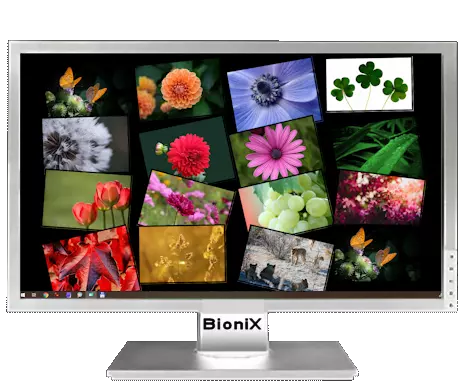
Photo Collage
Scatter your photos across the desktop in a natural, overlapping pile. Like pinning your favorite memories to a real desk.

Desktop Effects
Matrix digital rain, snow falling on your wallpaper, raindrops, falling leaves — animated effects that bring your desktop to life.
Smart Playlist Management
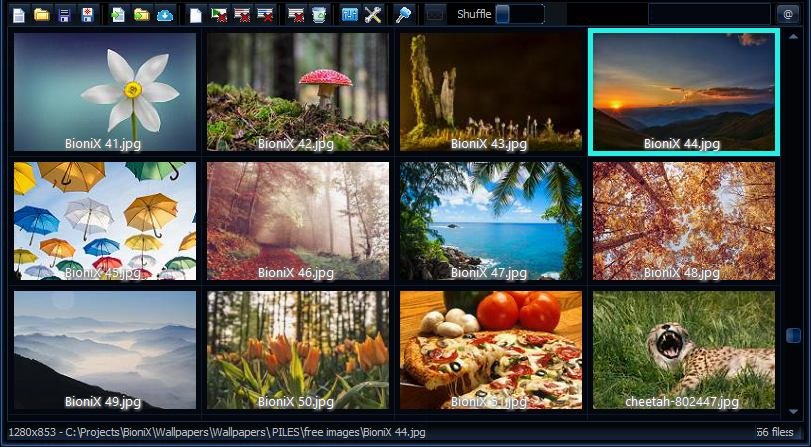
BioniX doesn't just change wallpapers — it manages your entire image collection with the precision of a music player.
- Drag & drop images and folders
- Filter by name, path, rating, or EXIF data
- Sort by name, date, size, or custom order
- 5-star rating system for every wallpaper
- Automatic folder monitoring for new images
- Batch import from web pages and Flickr
Features No Other App Has
25 years of development gave BioniX capabilities that neither Wallpaper Engine nor Lively offer.
Day & Night Wallpapers
Automatically switch wallpapers based on your local sunrise and sunset. Bright scenes during the day, moody ones at night.
Lock-on-Folder
Point BioniX at any folder and it watches for new images. Drop a file in, it joins the rotation instantly.
Ken Burns Effect
Gentle pan-and-zoom over static images, like a documentary camera. Turns any photo into a cinematic experience.
Per-Monitor Plugins
Run a slideshow on one monitor, a photo collage on another, and Matrix rain on a third. Each screen gets its own setup.
Desktop Overlays
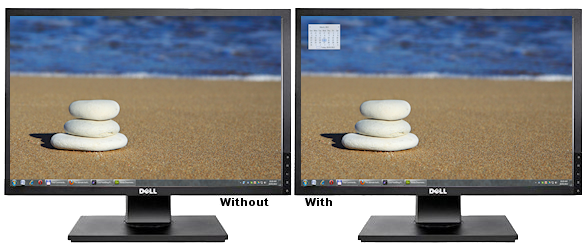
Add text, calendar, system info, or custom images directly on top of your wallpaper. Turn your desktop into a dashboard.
Snow, Rain & Leaves
Animated particle effects fall gently over your wallpaper. Seasonal, atmospheric, and surprisingly calming.
Smart Color Matching
BioniX detects your wallpaper's dominant color and matches the desktop background. No more ugly black bars around small images.
EXIF Auto-Rotation
Photos from your camera display correctly, automatically. No more sideways images on your desktop.
For Home & Business
BioniX isn't just for personalizing your desktop. Businesses around the world use it for:
- Shop window displays with rotating promotions
- Corporate branding on office workstations
- IT hardware info overlays showing system stats
- Digital signage in lobbies and waiting rooms
- Kiosk and museum exhibition screens
Licenses for one workstation or for every computer at one site: see the order page.
Safe & Lightweight
No frameworks, no dependencies, no crapware. Just a clean, fast application.
No Dependencies
No .NET, no Java, no runtime libraries. BioniX runs straight out of the box on any Windows PC.
USB Portable
Copy it to a USB stick, plug it into any computer, run it. No installation required.
Wide Compatibility
Works on Windows Vista, 7, 8, 10, and 11. Supports multiple monitors, high DPI, and virtual desktops.
CPU-Friendly
BioniX pauses effects when you're gaming or running on battery. Your resources come first.
Frequently Asked Questions
Common questions about BioniX Wallpaper.
Is BioniX Wallpaper really free?
Yes. BioniX Wallpaper is free to download and free to use. A 15-day trial unlocks every feature. After that, you can either buy a license or get a free membership through the community program: post about BioniX, and how far your post reaches decides the membership.
Which versions of Windows does BioniX support?
BioniX Wallpaper runs on Windows Vista, 7, 8, 10, and 11. It supports multiple monitors, high DPI displays, and virtual desktops. No .NET framework, no Java runtime, no third-party dependencies required.
How is BioniX different from Wallpaper Engine and Lively?
BioniX is a full wallpaper changer — not just a live wallpaper player. It rotates static images on a schedule, plays videos and GIFs as live wallpapers, arranges photos into collages, and adds animated effects like Matrix rain, snow, and raindrops. Features like day/night switching, Ken Burns pan-and-zoom, EXIF auto-rotation, per-monitor plugins, and smart color matching are not offered by Wallpaper Engine or Lively. See the BioniX vs Wallpaper Engine and BioniX vs Lively comparisons.
Does the live wallpaper feature slow down my PC?
BioniX is built for low CPU and GPU use. It automatically pauses animated wallpapers and effects when you launch a full-screen application (a game, a video player) or when your laptop runs on battery. Static wallpaper slideshows use essentially zero resources.
Can I use BioniX on multiple monitors?
Yes. BioniX Wallpaper fully supports multi-monitor setups. Each monitor can run a different mode: slideshow on one screen, photo collage on another, live video wallpaper on a third. Mixed-DPI and different-resolution setups are handled automatically.
Is BioniX safe? Why does Windows SmartScreen warn about it?
BioniX is safe. SmartScreen warns about new downloads that have not yet built up a download history with Microsoft — even signed programs see the warning at first. BioniX is scanned by Microsoft Defender and VirusTotal on every release and has a 25-year track record. Click More info then Run anyway on the SmartScreen dialog — full details on the install page.
Is BioniX portable? Can I run it from a USB stick?
Yes. BioniX Wallpaper is fully portable. Copy the installation folder to a USB stick, plug it into any Windows PC, and run the executable — no installation, no registry entries, no admin rights needed.
What wallpaper formats does BioniX support?
Static images: JPG, PNG, BMP, WebP, GIF, TIFF, HEIC. Live wallpapers: MP4, AVI, MKV, WebM (video), animated GIF, and animated WebP. Photos from digital cameras are auto-rotated using EXIF orientation metadata.
How do I install BioniX Wallpaper?
Download the installer from the download page. Run it — no admin rights required. If Windows SmartScreen warns about an unrecognised publisher, click More info then Run anyway. Detailed steps with screenshots are on the install guide.
Is BioniX available for Mac or Linux?
BioniX Wallpaper is Windows-only. It is built on the Windows desktop window manager and uses native Windows APIs for multi-monitor handling, hardware acceleration, and tray integration. There is no macOS or Linux build planned. On macOS, look at native tools like AppleScript-driven wallpaper rotation; on Linux/GNOME use gsettings + a cron job, or community tools like variety.
How do I set a video as my desktop wallpaper on Windows?
Windows does not natively support video wallpapers. The Personalisation panel only accepts static images, slideshows of folder contents, and Microsoft's "Windows Spotlight" rotation — no video, no animation. To run an MP4, AVI, MKV, MOV, or WebM as your desktop background you need a third-party tool. BioniX Wallpaper plays video files directly to the desktop, with volume control and aspect-ratio options. Other options for the same job: Wallpaper Engine (paid, Steam) and Lively Wallpaper (free, open source) — see the honest comparisons.
How do I set an animated GIF as my desktop wallpaper?
Windows treats an animated GIF as a static image and shows only the first frame — the animation is dropped. To actually play the GIF on your desktop you need an app that renders frames continuously behind the icons. BioniX Wallpaper supports animated GIF and animated WebP natively: pick the file in the playlist, the GIF plays frame-by-frame at its native rate. Supports multi-monitor (one animated GIF per monitor, or the same on all), pauses automatically on full-screen apps and on battery.
How do I rotate desktop wallpapers automatically on a schedule?
Windows has a built-in slideshow: Settings > Personalisation > Background > Slideshow, point it at a folder, set an interval. It works but is limited — one folder, one interval, no per-monitor control, no effects, no metadata, no ratings, no online sources. A dedicated wallpaper manager like BioniX Wallpaper adds unlimited playlists, per-monitor scheduling, online image sources, smart shuffle, EXIF auto-rotation for camera photos, and visual transitions between wallpapers. The 15-day trial is free.
How do I show different wallpapers on each monitor in Windows?
Windows 10 and 11 do allow different wallpapers per monitor through Personalisation > Background: right-click an image in the explorer view of "Choose your pictures" and pick "Set for monitor 1/2/3". This works for static images only and resets when you reconnect or rearrange monitors. For independent slideshows, video wallpapers, animated GIFs, or different effects per monitor — including span modes (one image stretched across all displays) — you need a wallpaper manager. BioniX Wallpaper handles this with three modes: Clone (same on all), Expand (stretch across), Individual (independent per monitor).
How do I make my Windows desktop look more interesting?
A few cheap, high-impact changes: (1) Pick a high-resolution wallpaper that matches your screen ratio — Wallhaven, Unsplash, and AlphaCoders have free libraries. (2) Add a subtle live element: an animated GIF, a video loop, or particle effects like snow or rain layered over a still image. (3) Use a wallpaper rotation so the desktop doesn't get stale — even a 30-minute interval helps. BioniX Wallpaper does all of this out of one app: video and GIF wallpapers, scheduled rotation, particle overlays (snow, leaves, rain), and a parallax engine for layered scenes.
What is the difference between a "live wallpaper" and an animated desktop?
The terms are used loosely but normally mean different things. A live wallpaper usually means a video or interactive scene that plays continuously behind the icons — common on Android and now possible on Windows via third-party tools. An animated desktop is broader: it can mean a live wallpaper, an animated GIF as background, particle effects layered over a still image (snow falling, leaves drifting, rain), a parallax scene where layers move at different speeds when the cursor moves, or a slideshow with animated transitions between images. BioniX Wallpaper supports all of these — you can use just one or layer them.
Ready to Try BioniX?
Download it free. No account needed, no strings attached. If you like it, join the community — it's free too.